Studio-Grade Portraits from Your Photos
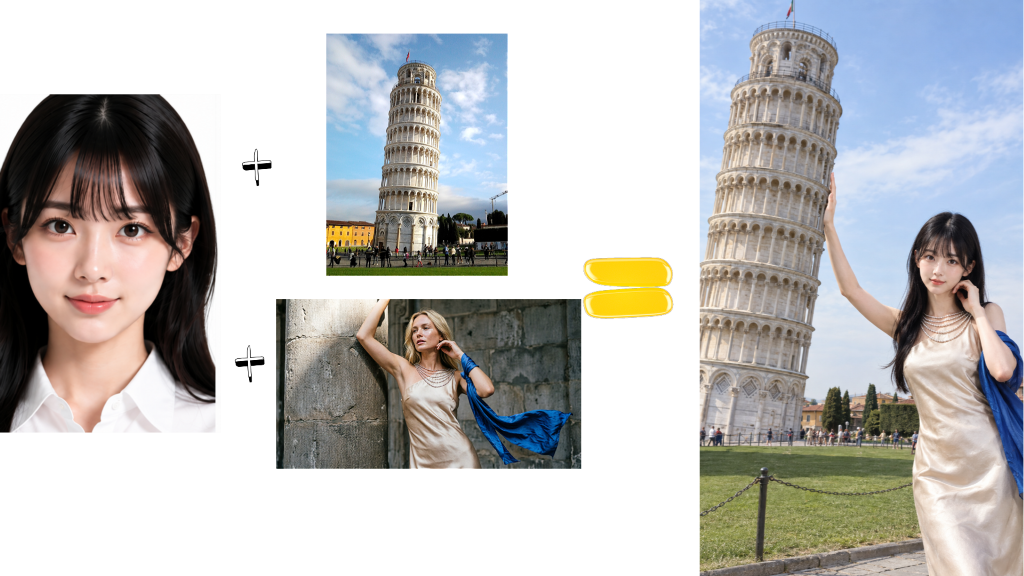
Upload one photo, add a few reference images for outfit, scene, pose or colour, pick a style, and let our AI deliver a portrait that looks just like you.
Powered by OpenAI GPT-Image-2.5
Why Choose AI Portrait Studio
Reference-driven styling keeps your likeness locked in
True-to-You Likeness
A single clear front-facing photo of you anchors the identity lock across every style and scene.
Reference-Driven Styling
Tag up to 5 reference images for outfit, accessories, scene, pose or colour - the model blends exactly what you ask for.
Curated Style Presets
Guofeng, wedding, retro film, cyber night, travel - or let Auto match pick the look that suits your references best.
Your Own Direction
Add a free-text prompt for fine-grained control over light, gaze, props or mood - up to 300 characters.
How to Create Your AI Portrait
Three steps from selfie to studio portrait
Upload Your Photo
Pick a clear front-facing photo of yourself. Group shots and heavy filters reduce likeness.
Add References & Style
Optionally add up to 5 reference images, tag what to reuse, then choose a style and scene preset.
Download Your Portrait
AI blends your likeness with the references and delivers a high-resolution portrait ready to share.
Creative Use Cases
Where AI Portrait Studio shines
Personal Branding
Build a cohesive set of portraits for LinkedIn, resumes or a personal website - no studio booking required.
Social & Dating Profiles
Refresh Tinder, Instagram or X with eye-catching portraits that still look unmistakably like you.
Themed Keepsakes
Try on wedding, travel or hanfu looks with friends and family - perfect for printed keepsakes and gifts.
Frequently Asked Questions
Will the portrait actually look like me?
Yes. Your uploaded photo acts as an identity lock. Style, scene, colour and wardrobe change, but the facial likeness stays close to your source photo. A clear, front-facing single-person photo gives the best result.
Do I have to upload reference images?
No. References are optional. You can pick a style and scene preset, click "Surprise me" for a random template, or write your own direction - the model will work with whatever you provide.
What can I tag on a reference image?
Each reference can be tagged as Outfit, Accessories, Scene, Pose or Colour, or left on Auto so the model decides what to reuse. One image can serve several purposes, and you can upload several images for the same purpose.
Is my photo data safe?
Absolutely. We never store your photos permanently. All data is automatically deleted within 48 hours after processing.
Ready to Create Your Portrait?
Upload a photo and let our AI craft a studio-grade portrait in seconds
Create Your Portrait